When a consumer has multiple invoices/accounts, there are many things that need to be considered about which accounts can take payments and which accounts can have payments combined together. By default, consumers make individual, recurring or settlement payments on each account individually. This allows for each payment to be applied to the appropriate account and it is easy to reconcile and sync with your CRM.
One method to deal with this limitation is to have the concept of Parent Accounts. Parent Accounts allow some accounts to exist underneath another account. The accounts roll up to the parent Account. Payments can be made on the Parent Account or the Child Account. You can read more about them here:
https://support.concepts2code.com/support/solutions/articles/44002530781-parent-and-child-accounts
An alternative to using Parent Accounts is to enable the All Pay feature. This allows consumers to pay on all accounts at once. In other words, they pay towards their combined balance. This article explains that option and how the All Pay feature determines what options are available when different accounts have different options.
All Pay must be enabled for these features to work. If you would like to enabled this feature please contact support@concepts2code.com and we will review the specifics of how it will work with your specific CRM.
When a consumer only has one or two accounts it is relatively straight forward. When a consumer has a larger number of accounts paying on each can be a burden. In addition, if multiple accounts have different payments plans being offered it gets even more complex.
All Pay works by rolling up all payable accounts and allowing the consumer to make payments on the rolled up combined balance. All balances are rolled up and to the extent possible all payment options are preserved. Similar payment plans and settlement offers are combined.
Things to Consider
- When using the All Pay feature, you should not have any Parent Accounts in your data. Mixing Parent accounts and All Pay is not supported because the attempt to solve the same problem in different ways and are not compatible.
- When payments are sent to the Processors, only one of the accounts will appear on the credit card data. The reason for this is that each credit card transaction requires a single account number. The benefit to the customer is that there is only one payment on their credit card even if it applied to multiple accounts internally.
- Your CRM is responsible for applying the payment to the appropriate accounts based on your internal rules. This should be considered before enabling this feature.
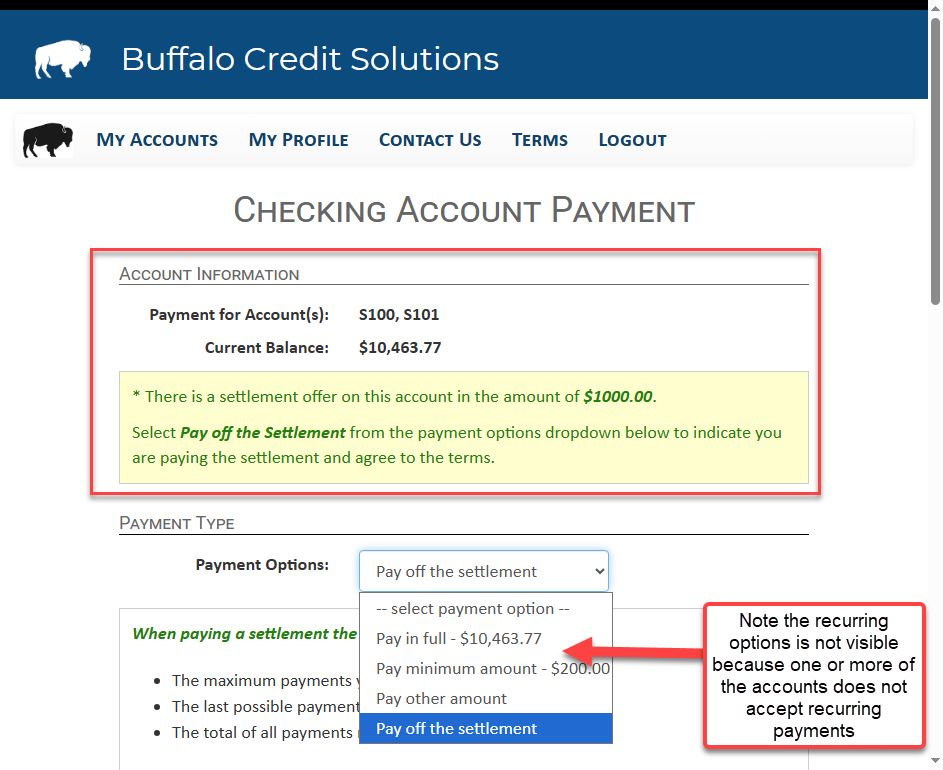
- If mixed accounts take different payment methods, only the payment methods that are available on all combined accounts will be presented.
- For settlements, the system will merge them together if the structures are the same. For example, if 2 accounts have a 3 part settlement in which the final payment is the same day, they will be merged. It will ignore settlement offers that cannot be merged. It is best practice to offer similar settlement structures to ensure they can be merged and presented to the consumer.
Key Changes
Once you enable All Pay, new button will appear at the top showing the ability to pay on all Payable Accounts. A Payable Account is one that allows the consumer to access it. The consumer can still access individual accounts and make payments there, but the focus is on the combined balance.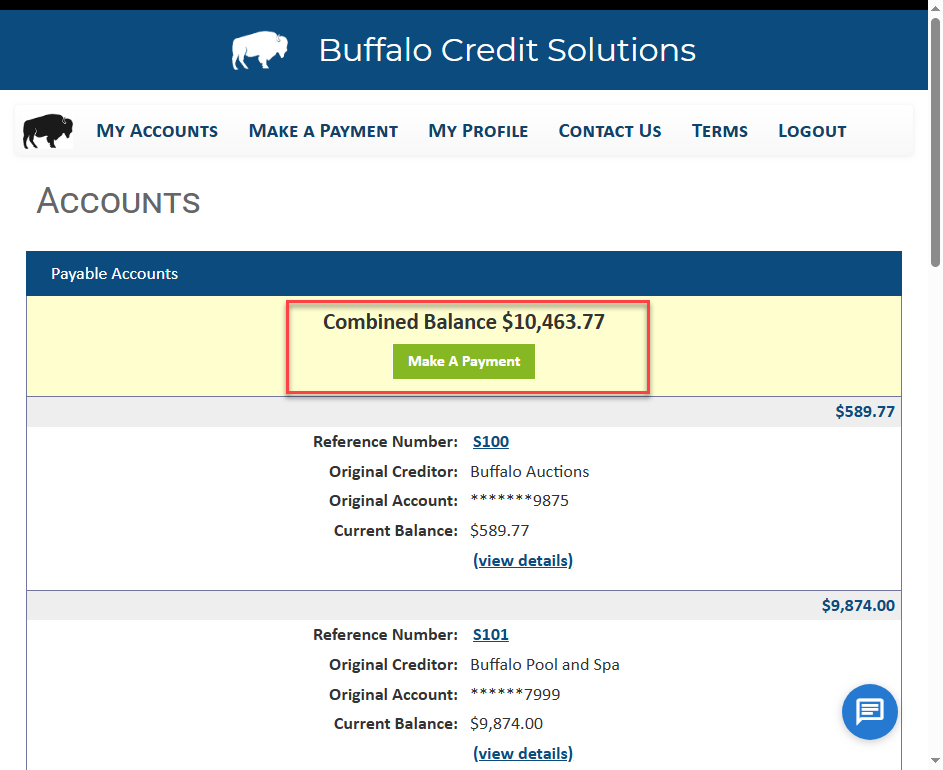
After selecting Make a Payment, the user will be shown all Offers that can be rolled up together and it will show that they are paying on multiple accounts.
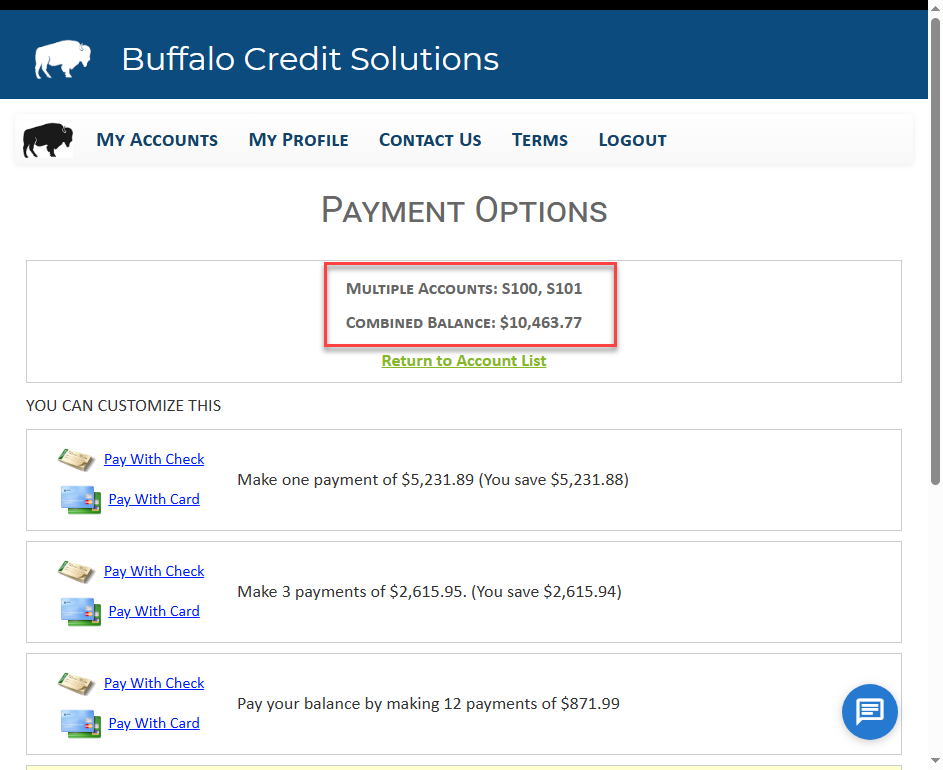
Be aware that combined offers will limit the payment options to the most restrictive account, so you should ensure your setting allow the same payment options on most accounts if you are using this feature.
Was this article helpful?
That’s Great!
Thank you for your feedback
Sorry! We couldn't be helpful
Thank you for your feedback
Feedback sent
We appreciate your effort and will try to fix the article